

Users can scan the network and identify all attached ToughSonic ultrasonic sensors.






Senix ultrasonic sensors can be connected in multi-sensor data networks to retrieve measurements and/or adjust group settings via SensorView™ software.
An entire collection of data-networked sensors can be managed, stored and retrieved using a SensorView feature called Group Control. Additionally, multiple sensors can be synchronized via "SYNC" mode to prevent cross-talk and/or assure simultaneous measurements.
These data networking and SYNC functions are mutually exclusive, but serve different purposes.
Data networks are created by wiring two or more ToughSonic® sensors in a multi-drop configuration.
These sensors can be any RS-485 model type, but all must have independent addresses and use the same baud rate.
Ultrasonic sensors in continuous mode will update analog and switch outputs independent of the network requests, while sensors in polled mode will only measure and update outputs upon receiving a network request.
A four-wire data cable can supply both data and power to the sensors, or sensors can instead be locally powered.
Group Control is a feature of SensorView software that permits a data network to be managed, backed up, restored, or duplicated quickly.
Users can scan the network and identify all attached ToughSonic ultrasonic sensors.
Select some or all ultrasonic sensors to receive selected parameter changes made in SensorView.

Save all sensor configurations in a single backup file, or restore an entire network from that file.
Group control can also be used in a sensor synchronization group—also referred to as Senix's "SYNC" mode.
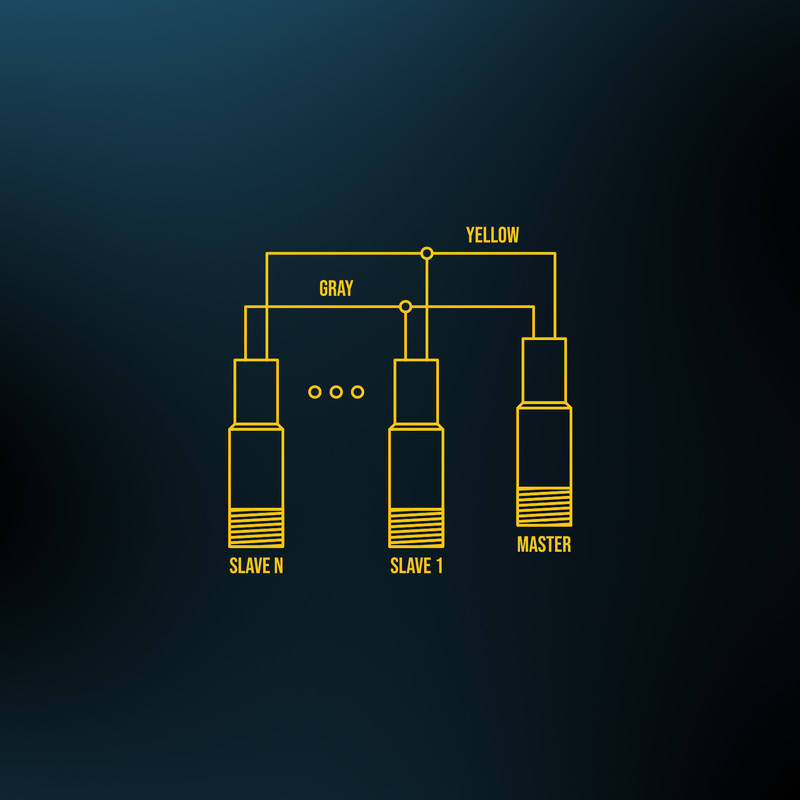
Multiple sensors can be connected to prevent cross-talk or assure simultaneous measurements. Sensors can be RS-232 or RS-485, but RS-485 easily allows Group Control to manage the sensors.
SYNC networks are created by wiring the yellow and gray communications wires of all sensors together. Operating SYNC groups cannot simultaneously act as a data network.
SYNC consumes the serial data port and assumes the sensor’s analog and/or switch outputs are used. One sensor is selected as the group "Master" and the remaining sensors as "Slaves." Up to 31 sensors can be selected for each Master.
Selection is made using the TEACH push-button or SensorView software. The Master can have between 1 and 5 "phases." Its measurement interval determines the phase timing.
Sensors measure simultaneously, sequentially, or in groups depending on their phase configuration.
SensorView's Group Control feature can be used if the Master sensor is deactivated by turning it into a Slave.
The Master can be turned into a Slave using the TEACH push-button, or if SensorView is connected and the Master is active, Group Control will offer to turn off the Master.
With the Master off, all sensors will respond to Modbus commands, just like a data network. RS-232 sensors set to Master or Slave automatically switch their serial data to RS-485 for SYNC.
Want more information about Group Control, SYNC mode, or wired ultrasonic sensor connections? Contact the Senix team today.