

Each ToughSonic ultrasonic sensor has been assigned a unique network address between 1 and 247.






Senix ToughSonic® 100-series and 200-series sensors can be configured in wired networks from two to 32 sensors, in any mix of RS-485 models.
Sensors are first configured with unique addresses using SensorView™ software. Once wired into the network, the “Group Control” feature of SensorView simplifies network management.
For ease of system control, ensure these three requirements are met before networking ToughSonic sensors.
Each ToughSonic ultrasonic sensor has been assigned a unique network address between 1 and 247.
All ultrasonic sensors must be RS-485 models and are configured to the same Baud rate—9600 baud is the factory default.
Sensor wiring is a serial multi-drop configuration. The bus should have terminal resistance across the two data lines at each end.
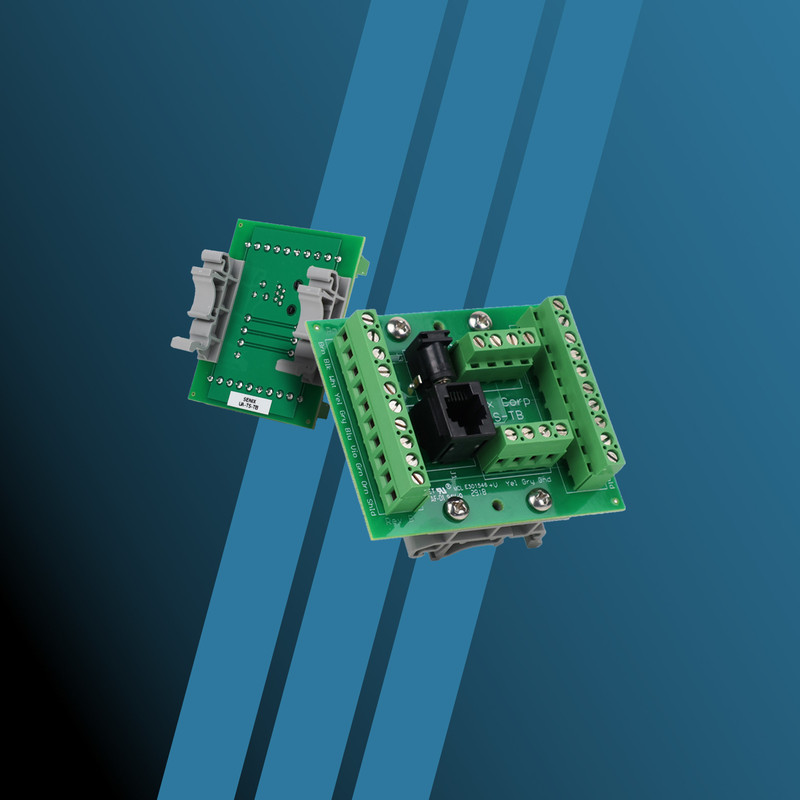
The UA-TS-TB Termination Board provides separate wire terminations for a sensor, data cables between sensors, and optional pass-through of sensor outputs to local equipment using the sensor’s analog or switch outputs.
Examples include displays, relays, indicators, programmable logic controllers (PLCs), and level controls.
Once established, any sensor in the network can be individually reconfigured or monitored by address using SensorView.
If the network is controlled by another master—such as a PLC or PC—it must be disconnected or disabled before connecting to SensorView as the master.
NOTE: A single DC power source can supply the network at any location.
DC power is distributed to each node by the four-wire network terminals on each board. You must make sure that the single DC supply has the capacity to support the sum of ALL sensor current requirements on the network, including switching loads.
Once all sensors are configured and wired, SensorView's Group Control feature can be used to manage the network. Management features include:

Scanning the network and identifying all connected sensors

Selecting specific sensors in the group to be updated with parameter changes

Backing up, restoring or copying the entire network
If a user’s external master is controlling the network, it must be disconnected or disabled before using SensorView to prevent competition between the masters.
Group Control can also be used in a SYNC group, where one sensor acts as the master control for one or more slave sensors, and includes a feature to suspend the master sensor to gain access to the group.
Specific instructions are available in the user manual for each ToughSonic model. Additional assistance with this feature is always available from technical support.