






SensorView™ Ultrasonic Sensor Setup Software
[CLICK HERE TO DOWNLOAD SENSORVIEW SOFTWARE]
SensorView software for Windows PC enables easy setup and advanced configuration of ToughSonic® ultrasonic sensors, included FREE with every ultrasonic purchase.
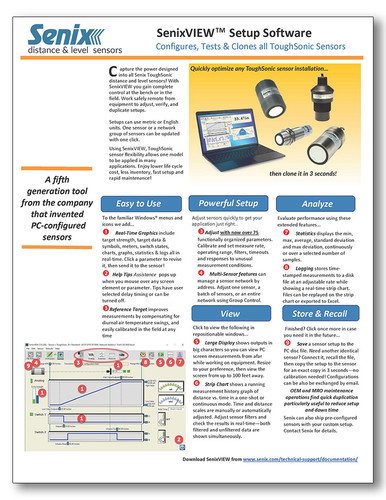
Senix's proprietary setup, adjustment, and data analysis application allows the user to fine-tune their ultrasonic transmitters with over 80 adjustable parameters. Make changes to operating range, measurement sensitivity and rates, outputs and filters, and condition responses—all in just a few keystrokes.
Using SensorView, users can even utilize ToughSonic sensors to system-test other connected automation equipment.
Key Features of SensorView
Powerful Setup – Enable/disable temperature compensation, set hysteresis and setpoint modes, adjust measurement rates, set switches to sinking/sourcing, and select status indicator functions for process control
Actionable Insights – Access statistical data (min, max, average, standard deviation, max deviation) and view historical, time-stamped strip charts
Real-Time Viewing – Click on a sensor to view its level measurements in real-time, including distance, outputs, and echo strength indications
SYNC Mode & Group Controls – Multi-sensor networks reduce crosstalk and synchronize measurements, utilizing RS-485 ultrasonic sensor models (or RS-232 converted to RS-485 temporarily)
Output Testing – Scale or calibrate downstream equipment via wired connection or remotely; identify issues and troubleshoot without need for an IT professional
Simple Duplication – Every sensor's configuration is stored in its system memory, but can also be saved to the PC disk file for cloning via SensorView software, ensuring seamless scalability when scaling up operations or sensor locations
SensorView™ Tutorial #1: Ultrasonic Sensor Wiring
SensorView™ Tutorial #2: Connecting to a ToughSonic Sensor
SensorView™ Tutorial #3: Basic Sensor Configuration
SensorView™ Tutorial #4: Analog Outputs
SensorView™ Tutorial #5: Basic Switch Setup
SensorView™ Tutorial #6: Switch Hysteresis
SensorView™ Tutorial #7: Pump Control with Alarms